|
Feature |
One-Click Checkout |
Traditional Checkout |
|
Process efficiency |
Single, highly compressed step to confirm and pay |
Multi-step process with several pages and mandatory fields |
|
Speed |
Much faster; enables near-instant order placement |
Slower due to repeated loading, navigation, and form completion |
|
User convenience |
Minimal input; shoppers mainly review and tap to confirm |
High effort; users repeatedly type the same details |
|
Data entry |
Key fields are pre-filled for returning shoppers |
Requires manual entry of personal and payment details each time |
|
Abandonment rate |
Lower, thanks to reduced friction and fewer interruptions |
Higher, driven by long, complex and repetitive checkout flows |
|
Customer satisfaction |
Higher, as the experience feels smooth, modern, and effortless |
Lower, as shoppers often feel frustrated or fatigued before completion |
|
Conversion rates |
Generally higher because barriers to purchase are minimised |
Can be suppressed by friction, leading to more drop-offs |
|
Implementation needs |
Relies on a robust customer database and secure payment layer |
Often needs heavier front-end flows and custom integrations to manage steps |
How KwikAds helped Shop Unrush boost ROAS by 37% in 3 months
How KwikAds helped Shop Unrush boost ROAS by 37% in 3 months
How KwikAds helped Shop Unrush boost ROAS by 37% in 3 months
How KwikAds helped Shop Unrush boost ROAS by 37% in 3 months
Kwik Checkout
What Is One-Click Checkout? How Does It Work?
 26 Mar 2026
 14 Min Read
Vardhan leads product and growth initiatives at GoKwik, driving D2C e-commerce innovations, conversion optimization, and scalable growth programs for products. An ISB alumnus based in Bengaluru, he brings expertise from Unacademy, Ola, and Mahindra in building high-impact product strategies.
Read this blog on your favourite platform
Checkout is the most important stage of any e-commerce buying journey. It is the stage where a shopper finally decides whether the item should be purchased or not. Reducing friction for the shopper can lead to higher conversion rates here, as it becomes easier to buy. A Cornell study noted customers increased spending by 28.5% and visited sites more often after one-click checkout was enabled.
The important thing today is to make the online buying process as easy as possible.
If you’ve carefully analysed an eCommerce store’s checkout journey, it demands shoppers to fill as many as 10-15 fields to finally land on the payments stage. While many brands have broken this process down into stages, the friction that shoppers experience continues to exist, causing high drop-offs and increased cart abandonment rates. Lengthy checkout processes are usually what hold so many businesses back from giving customers the ease of shopping they talk about and hitting their revenue goals.
That’s where a feature like one-click checkout comes in handy.
In this blog, we’ll explore what one-click checkout is, its benefits, and how to set it up on your online store with GoKwik.
The problem with traditional checkout
Traditional checkout fails mostly because it is slow, demanding, and not built for how people actually shop today. It creates friction exactly at the point where the shopper has already said "yes" by adding items to the shopping cart.
- Too many steps and form fields
Typical ecommercecheckout processes ask users to complete 10-15 fields spread across multiple pages (name, email, phone, address, PIN, landmarks, etc.). UX research shows that fewer steps in a compressed checkout dramatically reduce friction.
- High abandonment at the final stage
Global cart abandonment rates sit around 70–73%. "Too long/complicated checkout" is consistently reported as a top reason for abandonment. High current abandonment rates directly impact the bottom line of an online business.
- Repetitive data entry for returning shoppers
Even loyal customers are often forced to retype their shipping address, billing address, and payment information every single time they buy. This repetition breaks the "I’m ready to buy" momentum and hurts the overall customer experience.
- Hidden friction that costs real revenue
Each extra tap, field, or redirect adds micro-friction that compounds into lost sales at scale. For brands spending heavily on acquisition, an outdated checkout is effectively a leak in the funnel- burning paid traffic and suppressing conversion rate.
What Is One-Click Checkout?
In simple terms, one-click checkout is a fast checkout experience where a shopper can confirm their order in just one step, without repeatedly filling out long forms. After they click the checkout button, they are taken directly to the checkout page with their personal information pre-filled.
The goal is to make the shopping experience as simple as possible. It turns "I want to buy this" into a completed order in seconds. With GoKwik’s one-click checkout, a shopper only enters their details once. This information is securely stored, so for future purchases, the first step is also the final step.
WithGoKwik’s one-click checkout, a shopper only has to enter their basic shipping and billing information once on any GoKwik‑powered store- such as their name, email address, and delivery address. This information is then securely stored using GoKwik’s network intelligence, so when the same shopper returns to that brand or visits another merchant within the GoKwik network, their details are automatically recognised and pre-filled.
A typical journey looks like this:
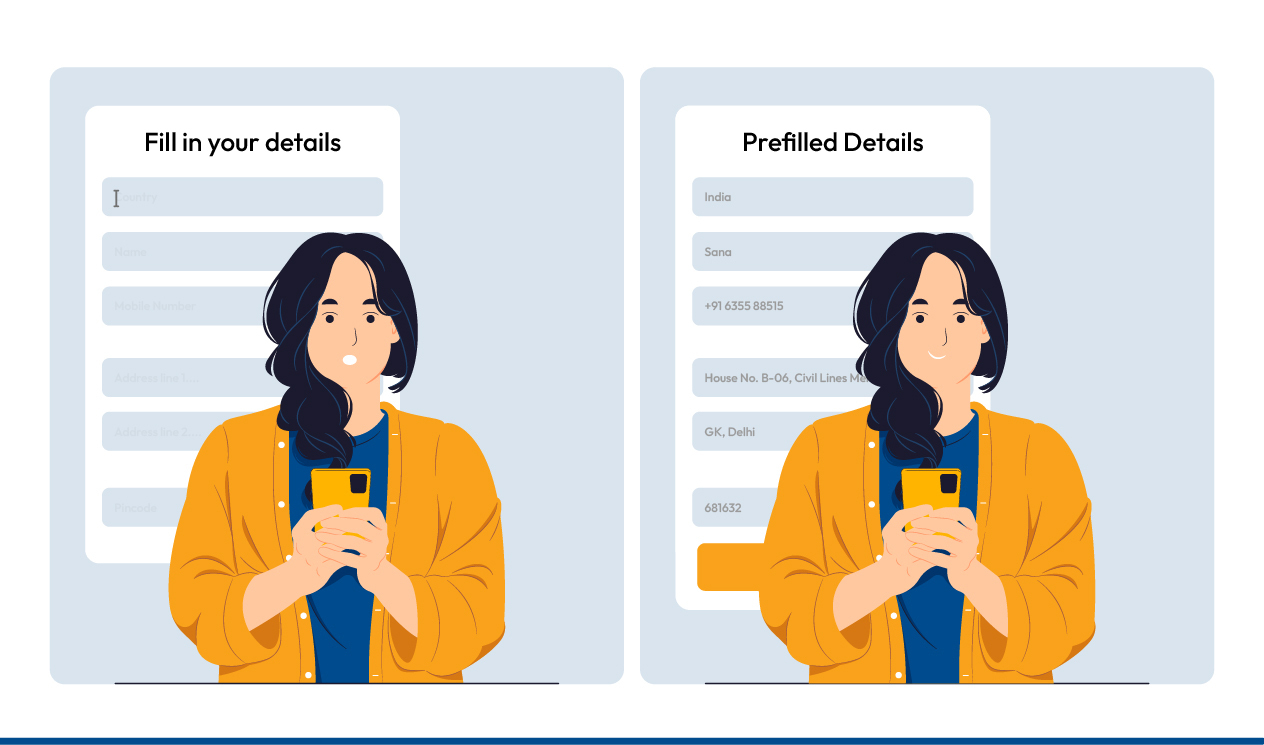
- Shopper A lands on a GoKwik-partnered eCommerce brand, selects their choice of products, logs in through SSO, and enters their delivery information for the first time.
- The next time Shopper A comes back to the same site, or visits another brand within the GoKwik network, the checkout form is already filled with their saved details.
- Shopper A simply reviews the information, taps continue, chooses a payment method, and completes the order in just a few seconds.
Another key advantage of GoKwik’s one-click checkout is that it works as an on-site, embedded experience rather than redirecting shoppers to a separate payment page or forcing them to manually re-enter personal data. This keeps the flow smooth and consistent, giving shoppers a frictionless path to purchase and helping brands convert more high-intent visitors into paying customers.
One-Click Checkout Vs Traditional Checkout
As mentioned above, one-click checkout offers a faster, more streamlined way to complete purchases. Unlike a traditional checkout that forces shoppers through several steps and form fields, one-click checkout lets them quickly skim pre-filled information and confirm the order with almost a single click.
So, what really sets one-click checkout apart from a standard flow? The table below highlights the key differences between one-click checkout and traditional checkout:
Key Benefits Of One-Click Checkout
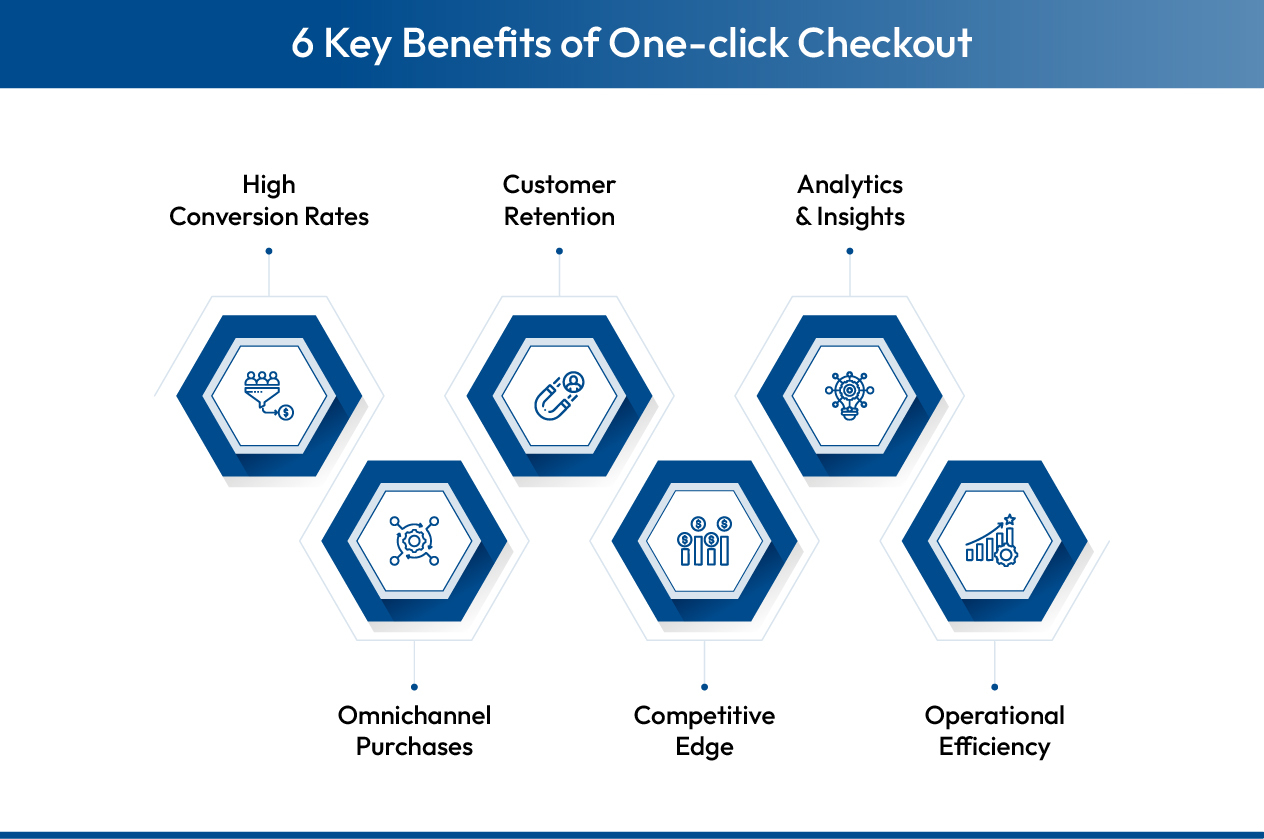
One-click checkout is supremely beneficial for e-commerce businesses as it encourages higher chances of purchase. However, that is not the only benefit:
Elevate Conversion Rates
The core purpose is to remove friction so more shoppers complete their purchase. By collapsing multiple steps, it leads to fewer abandoned carts. For shoppers on mobile devices, the ability to review details and confirm in seconds feels effortless, which encourages impulse buys.
Enhance Customer Retention And Brand Loyalty
One-click checkout strengthens long-term relationships. A smooth ecommerce checkout experience creates a positive memory, making shoppers more inclined to return to their favorite brand. When repeat customers know they can buy without re-entering card information or credit card information, they stay loyal.
Gain Data-Driven And Behavioural Insights
One-click checkout is a powerful engine for gathering data. Beyond just transactions, it helps with customer relationship management by tracking preferences. Brands can analyze behavior to fine-tune offers and ensure the payment card or method used is the customer's preferred one.
Support Omnichannel Purchases
It supports a consistent experience across channels. Whether on a desktop ecommerce website or via mobile commerce, the flow remains familiar.
Build Competitive Edge And Brand Differentiation
In a crowded eCommerce market, a smooth, one-click checkout clearly differentiates a brand as simple, customer-first, and modern. This convenience strengthens brand perception, encourages repeat purchases, and helps steadily grow customer lifetime value.
Improve Operational Efficiency And Resource Optimisation
A streamlined, reliable checkout leads to fewer user errors and support queries related to payment or order completion. With less time spent fixing checkout issues, teams can focus resources on growth initiatives while also getting better ROI from existing traffic and marketing.
Deep Dive: GoKwik’s One-Click Checkout
GoKwik’s one-click checkout is designed to help Indian D2C brands move shoppers from cart to payment in under a couple of minutes, without compromising on experience or security. It gives customers a fast, familiar checkout while helping merchants lift conversions and grow GMV.
What Is One-Click Checkout Powered By GoKwik?
GoKwik’s one-click checkout is an embedded checkout layer that sits on top of a brand’s existing storefront and compresses the entire flow into a quick, guided experience. Shoppers can review their details, pick a payment method, and complete the order in a matter of seconds instead of navigating multiple pages and long forms.
At the forefront, here’s how the UI looks:
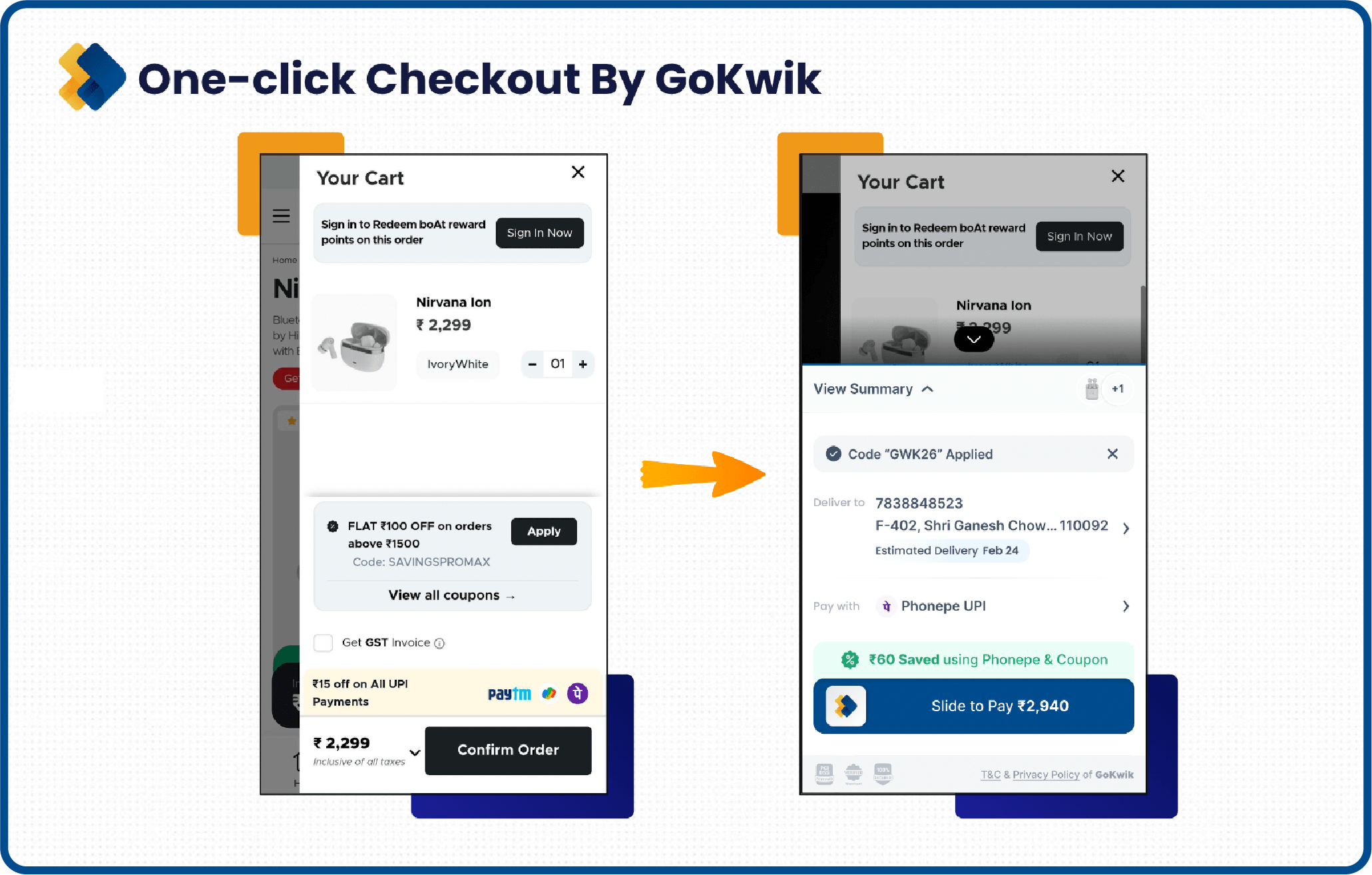
Here are the features of GoKwik’s One-Click Checkout that help make GoKwik a better tool for increasing the efficiency of the buying journey:
One-Click Login And Authentication (Truecaller, SSO, OTP)
GoKwik uses single-sign-on tokens built in-house along with Truecaller-based authentication to make login almost instant. Returning shoppers can auto-login on any GoKwik-powered merchant, while new shoppers can use one-tap Truecaller login instead of creating an account or going through lengthy OTP cycles.
Address Autofill And GoKwik Network Intelligence
With a network of 180 Mn+ shoppers, GoKwik can securely recognise returning users across its partner brands and auto-fill their saved addresses from past orders. This removes the need to retype name, email, and full delivery details, allowing shoppers to jump straight to order review and payment with minimal friction.
Multiple Payment Options And Prepaid-First Interventions
GoKwik’s checkout supports a wide range of payment options tailored for speed and convenience. Shoppers can pay via:
- UPI (including choosing a UPI app or scanning a QR code)
- Saved cards, where they only need to enter the CVV on tokenised cards
- Wallets, Pay Later, Net Banking, CRED, and cash-on-delivery
Experience-Led Conversion Boost
- Pop-up checkout instead of redirecting to a new page, so shoppers stay in one focused flow.
- Simple, clutter-free UI with fewer fields and steps, reducing effort and cart abandonments.
- Fully optimised for mobile, helping users complete purchases in a few taps on any screen size.
Trust, Security, And Control
- Built on secure APIs, encryption, and strong authentication to protect personal and payment data.
- Flexible login options like mobile + OTP or Truecaller instead of friction-heavy email logins.
- Brands can tailor fields, flows, and payment options to match their UX and business goals.
Network, Technology, And Proof Of Impact
- RTP-led checkout logic helps filter low-intent/riskier traffic and prioritise high-quality orders.
- A large network of shoppers and brands powers things like one-click login and autofill at scale.
- Acts as a full checkout and RTO-focused suite, helping brands improve conversions and GMV, not just “speed up” the last step.
GoKwik’s one-click checkout is built to do two things extremely well: make it ridiculously easy for shoppers to complete a purchase, and help brands turn more sessions into successful orders.
How To Set Up One-Click Checkout On Your Store with GoKwik?
GoKwik’s one-click checkout is designed to plug into your existing stack quickly, without forcing a major rebuild of your storefront. It works across popular platforms such as Shopify, Magento, and React Native, as well as custom setups, so you can standardise a fast, pop-up style checkout for all your customers.
Platforms And Tech Stack Supported
GoKwik’s checkout can be integrated with leading eCommerce platforms such as Shopify, WooCommerce, Magento, and other popular solutions, along with fully custom-built websites. The checkout layer operates on top of your native flow, so you do not need to change your existing design, theme, or backend logic to get started.
Step-By-Step Integration Flow With GoKwik for Non-Shopify Sellers
- First, you get in touch with GoKwik and set up a merchant account for your store.
- After onboarding, GoKwik’s team embeds a checkout plugin on your website that runs alongside your existing checkout without disrupting your current infrastructure.
- When a shopper proceeds to checkout, this plugin detects the activity and triggers the GoKwik-powered checkout pop-up as per your configuration.
- The pop-up renders your store’s key details and walks the shopper through a guided, one-click-ready checkout flow.
Step-By-Step Integration Flow With GoKwik for Shopify Sellers
- Install the Kwik Checkout app from the Shopify App Store.
- After onboarding, GoKwik’s team embeds a checkout plugin on your Shopify website that runs alongside your existing checkout without disrupting your current infrastructure.
- When a shopper proceeds to checkout, this plugin detects the activity and triggers the GoKwik-powered checkout pop-up as per your configuration.
- The pop-up renders your store’s key details and walks the shopper through a guided, one-click-ready checkout flow.

Experience For New vs Returning Shoppers
- New shoppers (not yet on the GoKwik network):
They are prompted to log in using their mobile number, OTP verification, or Truecaller-based authentication, and then add their address details. These details are stored securely for future sessions. - Returning shoppers (already on the GoKwik network):
They are automatically recognised and logged in, then taken directly to the address screen where their existing addresses are shown for quick selection. This allows them to skip form filling and move to payment in just a few taps.
Configuring Offers, Discounts, And Payment Mix
Once the address step is complete, shoppers land on the payments page inside the GoKwik checkout. Here, brands can:
- Decide which payment options to display (UPI, cards, wallets, Pay Later, Net Banking, COD, etc.).
- Apply GoKwik’s interventions to nudge more prepaid orders and reduce RTOs from COD.
- Surface discounts, offers, order details, and estimated delivery dates within the checkout panel itself.
After the payment is completed, the order information is recorded in the brand’s system as well as the GoKwik dashboard, and the merchant is notified of the successful conversion.
Is One-Click Checkout Right For Your Business?
One-click checkout is broadly suitable for most eCommerce businesses in India, but it delivers the strongest results when customers buy from you more than once. It works best for categories like fashion, beauty, FMCG, and other repeat-purchase verticals, and for stores with a meaningful base of returning shoppers and mid-high AOV orders.
Because the flow reuses data from previous sessions, returning customers can skip forms, review details in a single pop-up, and confirm in seconds- cutting drop-offs and cart abandonments at the final step. Showing full order details, pricing, and discounts in one view also reduces confusion and second thoughts.
From a risk perspective, one-click checkout can still align with your standards on security, UX, and control. The key is using a solution that keeps data secure, respects your brand’s look and feel, and lets you decide which payment methods and offers are shown at checkout.
Conclusion: Getting Started With One-Click Checkout
One-click checkout is not just a feature; it's a commitment to revolutionise the eCommerce experience. Through a user-centric design, a focus on security, customization options, and cross-device compatibility, GoKwik's one-click checkout stands out in the market. It addresses the evolving needs of both customers and e-commerce brands and caters to both in a seamless manner.
How to enable one-click checkout on your website? Get in touch today!
What is a one-click checkout?
One-click checkout lets customers complete a purchase with a single click/tap using saved shipping and payment details, instead of refilling forms every time.
Is 1-click checkout safe to use?
Yes. When implemented correctly, it utilizes encryption, tokenization, and PCI-DSS-compliant processors, ensuring that card details are stored and transmitted securely.
What is 1-click checkout with a link?
1-click checkout with a link sends the shopper a unique, secure URL (via email, SMS, or chat) that opens a pre-filled checkout so they can pay in one action.
How does one click pay work?
On the first purchase, the customer’s details are securely stored; on later purchases, clicking the one-click button triggers payment using those saved details.
How do I remove the 1-Click payment method?
You can usually disable it from your account’s payment or checkout settings by deleting saved cards/addresses or turning off “one-click” or “fast checkout” options.
What is a secure 1-Click checkout?
Secure 1-click checkout combines the speed of one-click checkout with protections like encryption, tokenization, fraud checks, and sometimes extra authentication to ensure that user information can be reused without compromising security.
What is an example of a one-click checkout?
Examples include Amazon’s “Buy Now” button, Shop Pay one-tap checkout, or GoKwik-style one-click pop-up checkout on D2C brand websites. Anywhere where the user can complete a purchase online in just a few clicks without re-entering their information again and again is a one-click checkout solution.

AUTHOR
Vardhan Jain
Director of Product Program @ GoKwik

Explore Related Blogs
Kwik Engage
8 Best AI Chatbots for E-Commerce in 2026: Features, Pricing and Best Fits
28-Apr-202614 Min Read
Kwik Engage
24 Types of Emails Every D2C E-Commerce Brand Should Send
14-Apr-202614 Min Read
Kwik Engage
What is Promotion Mix and How E-commerce Brands Can One for Maximum Sales?
13-Apr-202614 Min Read