How KwikAds helped Shop Unrush boost ROAS by 37% in 3 months
How KwikAds helped Shop Unrush boost ROAS by 37% in 3 months
How KwikAds helped Shop Unrush boost ROAS by 37% in 3 months
How KwikAds helped Shop Unrush boost ROAS by 37% in 3 months
eCommerce
5 Tips To Design A Perfect eCommerce Checkout Flow
 26 Mar 2026
 08 Min Read
Vardhan leads product and growth initiatives at GoKwik, driving D2C e-commerce innovations, conversion optimization, and scalable growth programs for products. An ISB alumnus based in Bengaluru, he brings expertise from Unacademy, Ola, and Mahindra in building high-impact product strategies.
Read this blog on your favourite platform
Checkout is the make or break point in customers’ buying journey. Believe it or not, the maximum number of dropouts happens during the checkout phase.
That is why it is essential to optimize your eCommerce checkout flow to ensure more engagement, fewer dropouts, and increased sales.
In this blog, we share how to optimize your checkout flow conversions.
5 Tips To Design The Perfect eCommerce Checkout Flow
To perfect your checkout flow, you’ll have to consistently keep track of it, make changes, try new strategies, and incorporate the best practices. Here are five tips to get you started.
1. Effortless Login
The login stage is one of the most critical in customers’ shopping journey on eCommerce sites. Many reasons can lead to a high bounce rate at this stage. For instance, a slow-loading login page, a lengthy or tedious login process, etc. Many sites make login compulsory without which customers cannot complete the checkout process.
While guest checkout can increase sales probabilities, it may not give you long-term benefits. For instance, you cannot collect customer data. Without data, you cannot personalize or retarget those customers in the future.
To make checkout easier, make your eCommerce checkout flow easy with a seamless checkout process.
- Design a fast checkout process
- Integrate one-click checkout
- Pre-fill address details
- Make payment quick, secure, and easy
- Integrate login via phone and OTP
2. Address Pre-fill
For returning customers, you can make the eCommerce checkout flow smoother with the auto-complete or auto-fill feature. Autocomplete is a feature that fills in address details as soon as customers start typing their addresses. The auto-fill feature fills in address details based on saved addresses from customers’ past purchases.
The address pre-fill feature has many benefits:
- It makes checkout faster
- It makes checkout error-free
- Refines mobile experience for customers
- Improves customer satisfaction
- Increases sales
- Helps with data collection and analysis
- Helps reduce drop-offs
3. Simplify Payments

Customers want everything to be easy and simple when they’re shopping online. This includes the payment process as well. When it comes to the payment stage in your eCommerce checkout flow, making it fast, seamless, and secure are key essentials. Here’s how you can simply the payment process and make checkout smoother:
- Offer multiple payment options for customers to choose from. Customers like to pay through their preferred payment methods, hence, the more payment options available, the faster the checkout.
- Save card details from past transactions and auto-fill payment details so that customers do not have to enter the details every time during the checkout process.
- Customers are wary of sharing their card details on multiple eCommerce sites. Hence, display security badges or signs to ensure customers that their data is safe and your payment gateway secure for them to trust your website.
4. Error-free eCommerce Checkout Flow
One of the biggest reasons customers leave eCommerce sites while shopping online is when there are crashes or errors. For instance, an unresponsive page, a crashed page, errors during the payment process, etc.
Customers tend to let go of small errors and continue shopping, but if there are any big errors, they tend to instantly leave the site. That’s because customers may lose trust or fear losing their personal information, etc. In short, customers want a good and seamless experience when shopping online. And any errors during the process can lead them to drop off.
Here’s how to create an error-free eCommerce checkout flow:
- Display checkout progress, for example, a progress bar, so customers are aware of the steps
- Ensure your eCommerce checkout flow is optimized for mobile
- Keep your checkout process tools and apps updated
- Incorporate auto-fill for address and payment details so that there are no errors
- Display error notifications when customers make an error, for example, when they forget to fill a detail in the form, highlight it in red so they know
5. Offer An Experience Beyond Purchase
Your checkout process is also an opportunity to strengthen your relationship with customers. And there are many ways to do so on your checkout page as well as once the purchase is made. Here are some best practices that will help you deepen your relationship with customers in the future:
- Display a thank you message, pop up or page
- Add other important messages on this page/pop-up
- Send thank you and follow-up emails and messages
- Send them informational content, such as tips, tutorials, etc., to make their purchase more valuable
Bonus — Tips To Optimise eCommerce Checkout Flow For Conversions This Holiday Season
While you pay attention to the above best practices and tips regularly, when it’s holiday or sale season, there's more you could do to optimize your checkout flow. Let’s look at a few things you could do:
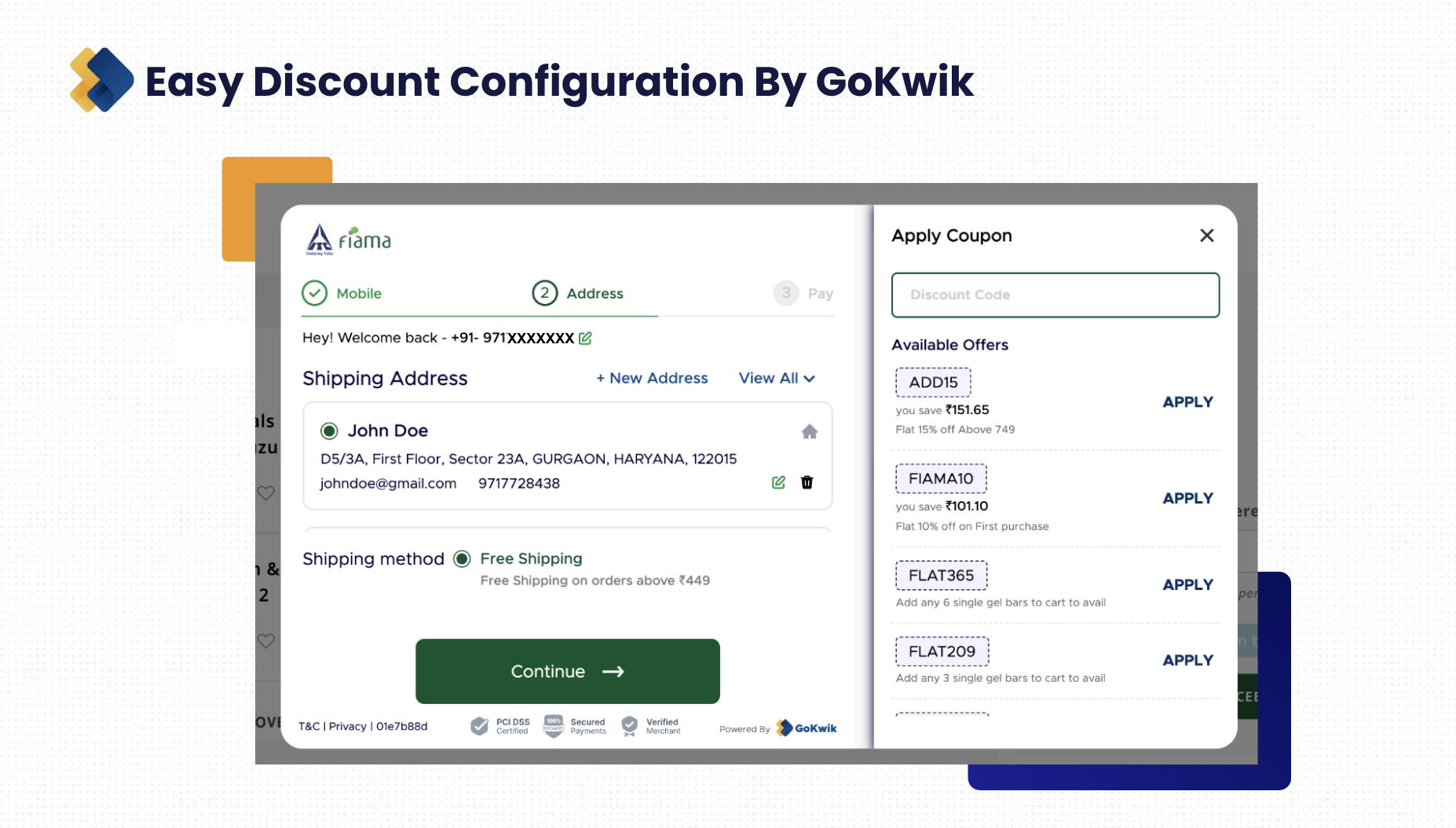
1. Display Discounts Prominently
Discounts, deals, and coupons are among the top incentives that help eCommerce brands increase sales. You can utilize the eCommerce checkout flow to boost sales during the holiday season. Here’s how:
- Display discount information prominently throughout the checkout process before and during the holiday season
- Make it easy for customers to apply discount codes and coupons by making the process simple
- Offer different types of discounts and deals to keep customers excited and engaged
- Automate discount configuration during the checkout process to make offering discounts easy and improve conversion rates
2. Display Live Sales Updates
Customers tend to shop a lot during the holiday season because of the big discounts. And they don’t want to miss out on buying their favourite products at lower prices. You can optimise the eCommerce checkout flow by displaying live sales notifications. Here’s what you can do:
- Personalize notifications by sharing updates about products that are in customers’ shopping carts
- Show the number of products remaining or getting sold to create FOMO
- Show a timer to create urgency. For example, show the number of hours the sale lasts
- Display the number of people who bought a specific product to encourage customers to shop
3. Show Shipping And Return Information
One of the first things that customers look for before placing orders are the shipping and returns policies. Even when buying from the holiday season sales, customers want the flexibility to return or exchange products when they want to. Additionally, they also want a decent delivery date. Here are some ways to enhance the checkout process during the holiday season:
- Prominently display shipping, returns, and exchange policies on the checkout page
- Do not keep any important information hidden so that customers feel confident making purchases
- Clearly indicate shipping costs, if any, or if shipping is free
- Let customers know the approximate delivery date
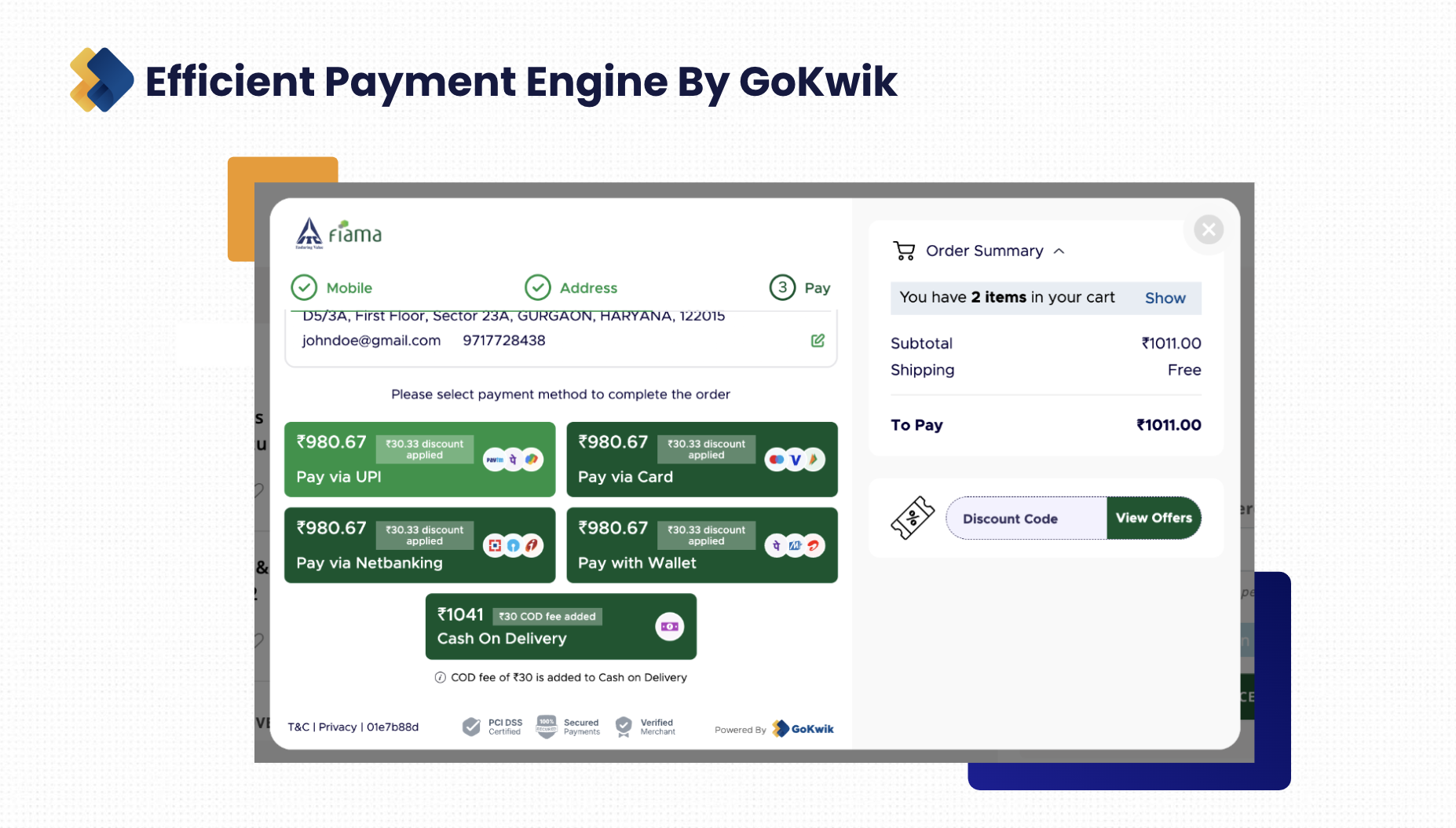
4. Provide A Holistic Payment Stack
Customers have specific preferred payment preferences. For instance, some customers prefer cards, mobile wallets, net banking, cash on delivery, etc. During the holiday season shopping frenzy, if customers don’t find their preferred payment modes, they might instantly leave the site and hop on to another site. To avoid this, do this:
- Offer multiple payment methods
- Incorporate automatic gateway switching
- Auto convert prepaid orders into cash
5. Create Real-time Offers And Deals
Based on the response your holiday season sale gets from customers, you can smartly create real-time engagement opportunities. These opportunities can not only help you improve sales but also collect customer data, initiate a connection with customers for future sales, etc. Here are a few things you could do:
- If you notice some products doing better than the others, double down on those products, for example, create bundle offers with those products, run real-time timely discounts on those products to increase sales, etc.
- Create real-time offers based on the time slot when customers tend to shop more. For instance, say there are more sales in the evening time, you could create special timely offers for the evening
- Offer discount codes and coupons that customers can use for purchases after the holiday season is over. That way, you can ensure sales during dull periods
Apply these eCommerce checkout flow tips to improve conversions on your site
A good checkout flow process makes the experience easy, fast, seamless, and enjoyable for customers. And that is why you need to incorporate some of the above tips and strategies.
However, you will also require a robust eCommerce checkout solution to support your strategies.
Meet GoKwik's Kwik Checkout — a fast checkout solution designed to boost conversions for eCommerce stores. Its comprehensive suite of features and capabilities helps eCommerce merchants strategically enhance the checkout process for long-term success. Explore and install GoKwik on your eCommerce store today!

AUTHOR
Vardhan Jain
Director of Product Program @ GoKwik