How KwikAds helped Shop Unrush boost ROAS by 37% in 3 months
How KwikAds helped Shop Unrush boost ROAS by 37% in 3 months
How KwikAds helped Shop Unrush boost ROAS by 37% in 3 months
How KwikAds helped Shop Unrush boost ROAS by 37% in 3 months
Kwik Checkout
How To Optimise Checkout Process To Increase Conversions And AOV
 20 Mar 2026
 08 Min Read
Parousia leads product marketing strategies at GoKwik, and she is an expert in driving e-commerce optimisation, conversion growth, and innovative GTM strategies. She crafts compelling messaging and creates content pertaining to D2C commerce.
Read this blog on your favourite platform
In eCommerce, the checkout process is the ultimate make-or-break moment for every potential sale. A seamless, user-friendly journey can transform a hesitant shopper into a loyal customer, while a cumbersome process may lead to cart abandonment.
Research says that almost 70.19% of shoppers will abandon their carts in 2024. This results in an over $18 billion loss in annual revenue for eCommerce brands. This is too big a number to be ignored.
In this post, we’ll discuss how you can optimise the checkout process to secure more conversions and increase the Average Order Value (AOV).
Let’s dive right in!
How To Optimise Your Checkout Process To Increase Conversions
Depending on what you’re selling and who you’re selling to, the checkout process varies a lot. But there are some general elements that you can add to your checkout process to make sure more customers complete the transaction. Here are some of tips to increase the conversions:
1. Add A Progress Bar On The Checkout Page
Going through a vast online marketplace can be overwhelming, especially for customers exploring many categories and products. An effective strategy to enhance the checkout conversion rate is the addition of an element as simple as a progress bar that offers real-time guidance. This feature, as used by leading e-commerce platforms, acts as a visual roadmap for users, ensuring they stay on course throughout the buying journey.
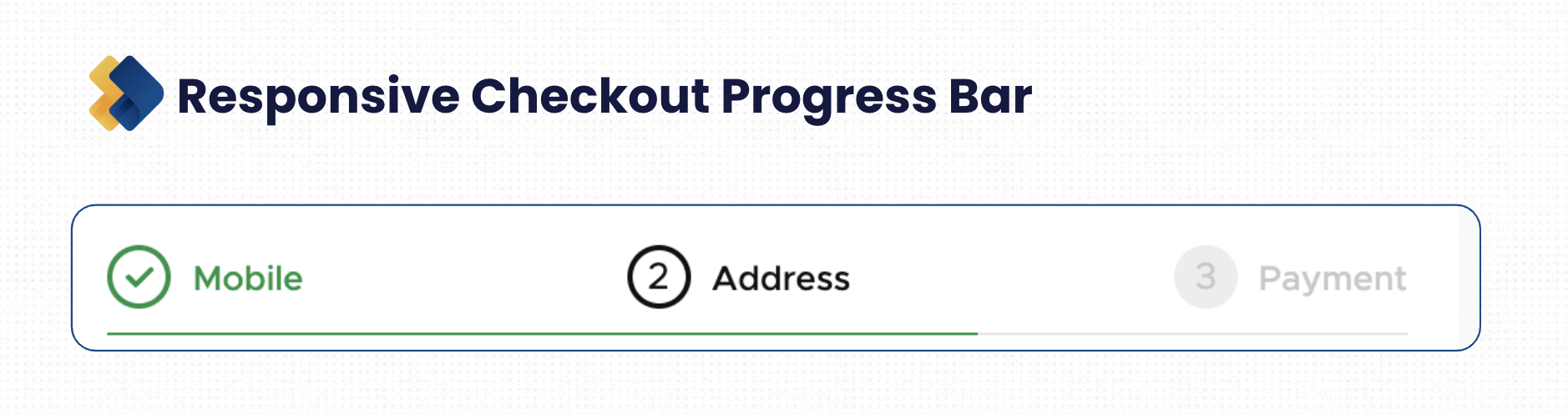
Adding a progress bar reduces the potential for customers to feel lost on your website, giving them a sense of control. To further refine this approach, consider implementing a timer for multiple-page checkouts. This visual cue informs users about their progress and introduces an element of urgency. More often than not, urgency will make them finish the purchase.
Proactively enhance the shopping experience by eliminating distractions. As a pro tip, refrain from displaying website navigation during checkout. By maintaining focus on the purchase, you minimize the risk of abandonment, ensuring customers remain engaged and motivated to complete their transactions.
2. Customers Want A Single-page Checkout
Customers who buy online want the navigation to be simple and quick. A streamlined checkout process is crucial for retaining customer interest and driving completion. To ensure that you give your customers a seamless experience, consider adopting a single-page checkout approach.
Studies from the Baymard Institute show that a well-optimised, user-friendly checkout should ideally have around seven form fields. Excessive fields, exceeding 15, can trigger frustration and abandonment.
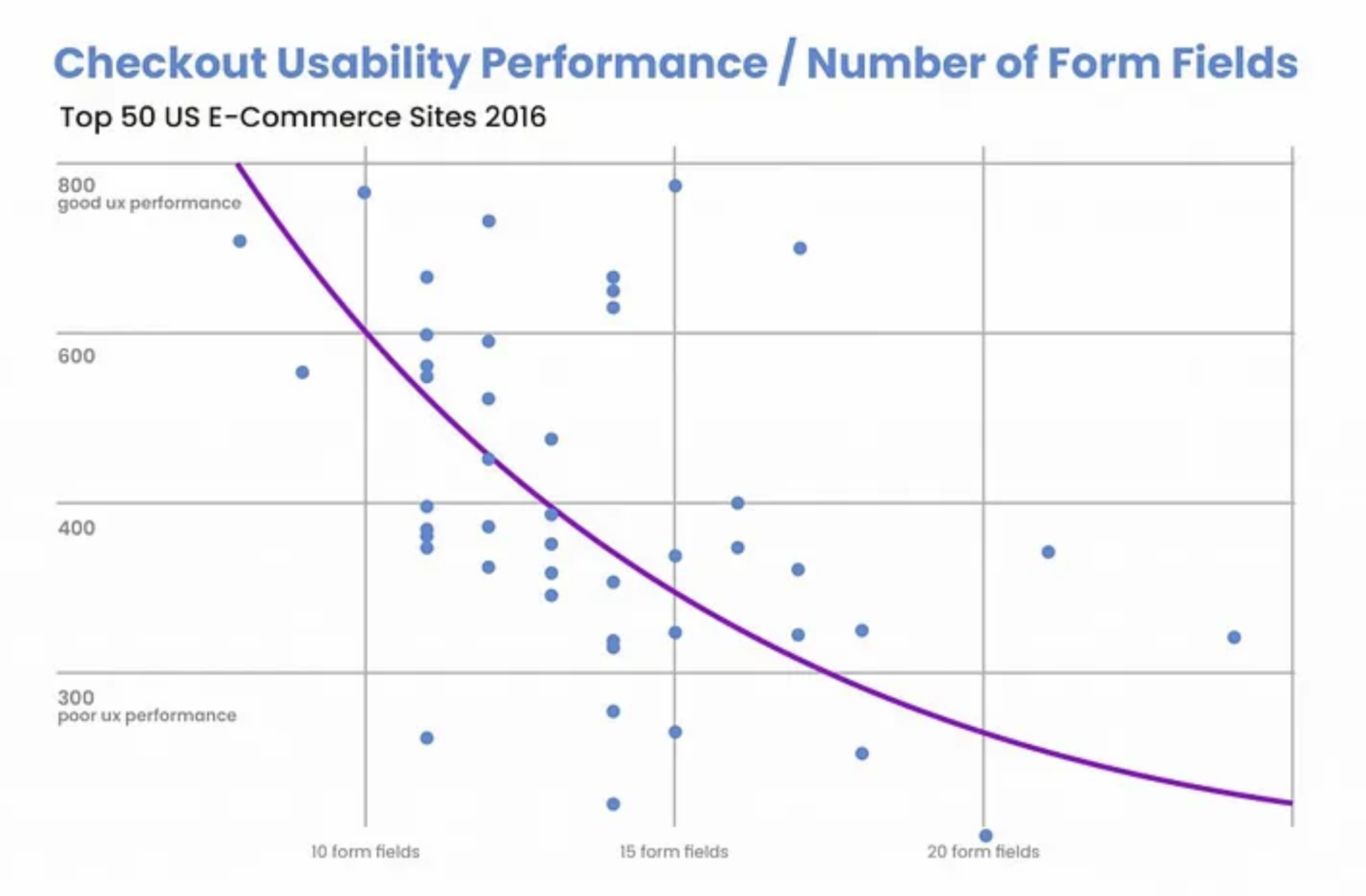
When creating your form, consolidate information and reduce redundant fields. For example, merge the first, middle, and last name into a single space and use the billing address as the shipping address.
Here are some of the benefits of one-page checkout:
- A simple checkout minimizes decision time, which helps reduce cart abandonment rates.
- Simplifying the process enhances the likelihood of completed purchases, maximizing conversions and profits.
- Customers crave a quick path to payment. One-page checkout ensures a rapid and comprehensible process.
- Avoid frustrating users with prolonged forms. A smooth, one-page checkout contributes to a positive overall customer experience.
While some argue that one-page checkouts limit data collection, modern analysis tools can help you extract valuable insights without compromising user satisfaction.
3. Let Customers Checkout Without Having To Sign-up
In eCommerce, mandatory registration is a significant hurdle, contributing to a substantial 24% of shopping cart abandonments. Knowing this, offering a guest checkout option is a crucial strategy to boost your checkout conversion rates.
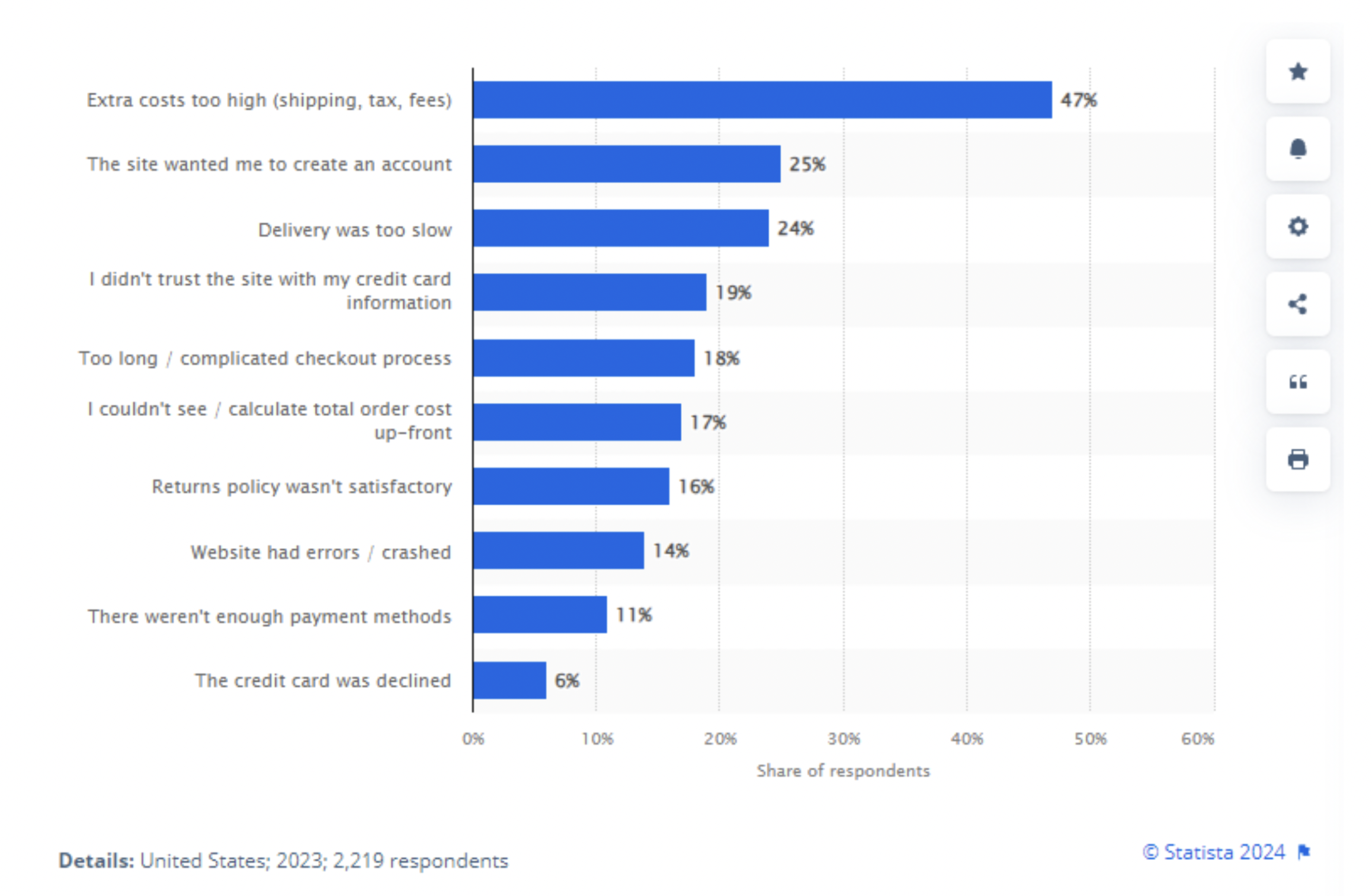
For many users, the obligation to create an account is a roadblock to completing a transaction. While registered accounts offer benefits for merchants and customers, including behavioral monitoring and stored payment data, it introduces an additional step in the checkout journey. To mitigate this friction, prioritize user convenience by presenting them with options.
Provide a seamless experience by offering alternatives. Let users decide whether to proceed with a quick and straightforward guest checkout or opt for the more extensive account creation process. Here’s how Apple does this.
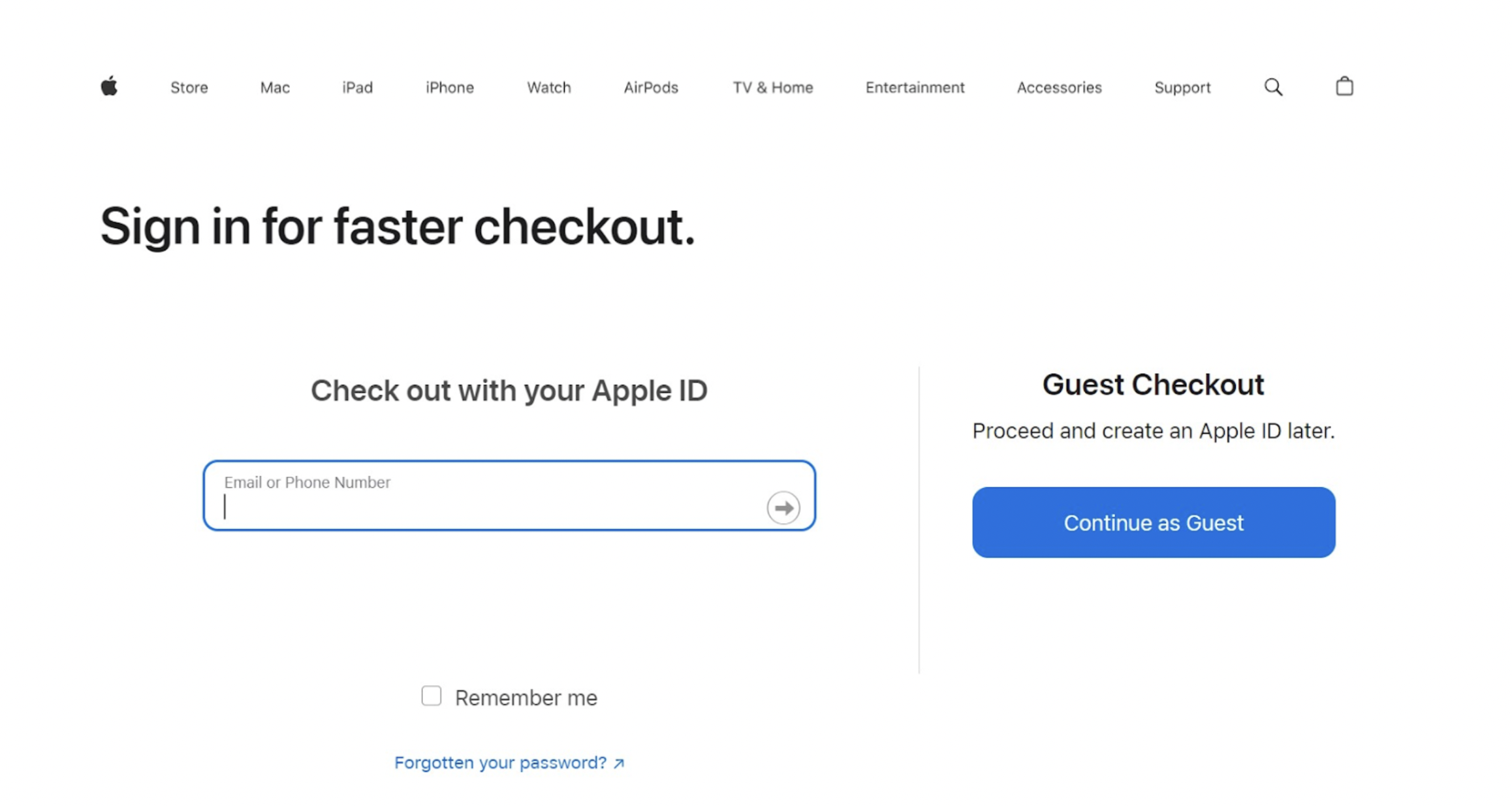
By accommodating diverse preferences, you not only reduce cart abandonment due to mandatory registration but also create a more inclusive and customer-centric experience. The result is a higher checkout conversion rate as users navigate through a checkout process which is built keeping their individual needs in mind. Take inspiration from industry leaders like Apple and give your customers a smoother path to checkout completion.
4. Add Automation Features On The Checkout Page
Automation is quite effective in optimizing the checkout process as it significantly expedites the user journey. Integrate automation features strategically to simplify tasks and enhance the overall shopping experience.
Implement auto-fill features for commonly entered information such as addresses and payment details. By minimizing manual input, customers save valuable time, which creates a more seamless and time-efficient checkout. The aim is to reduce friction and eliminate repetitive tasks, ensuring a smoother path from selection to purchase.
Enhance user convenience with predictive text features for form fields, helping users quickly and accurately complete their information. This predictive element reduces errors that can deter users from completing their purchases.

Prefilled Address with GoKwik Kwik Checkout on Swiss Beauty Store
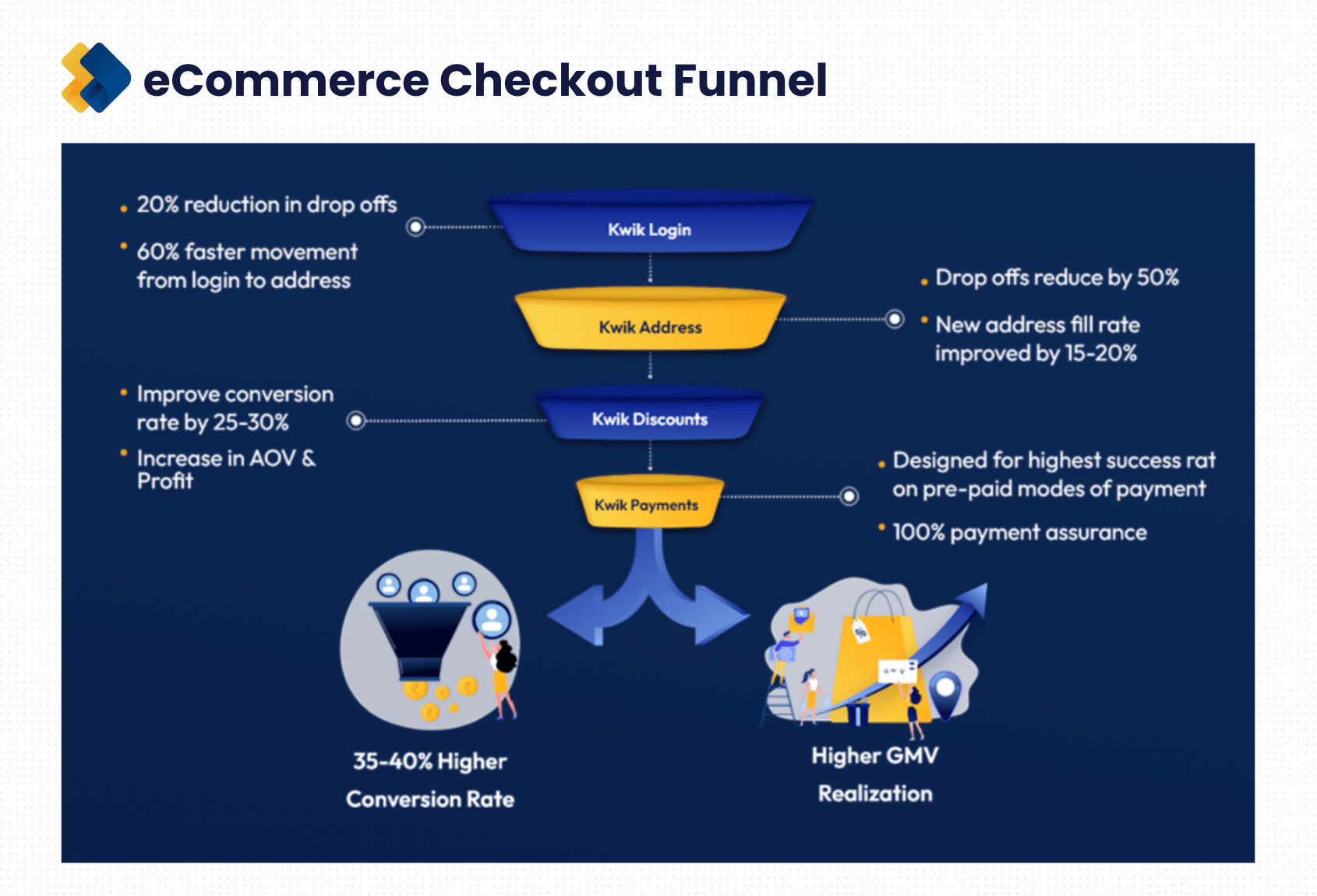
By integrating Kwik Checkout, you can offer pre-filled addresses to more than 85% of your customers. This advanced feature guarantees a hassle-free and rewarding checkout experience, eliminating the need for users to repeatedly fill in address fields.
Moreover, Kwik Checkout's commitment to providing smooth, reliable, and multiple payment options contributes to unparalleled transaction success rates, further solidifying its role in optimizing the checkout process.
How To Optimise The Checkout Process To Increase AOV (Average Order Value)
You can optimise your checkout process to help you sell more. Here are some tactics we recommend:
1. Cross-sell Frequently Bought Together Products
Boost your average order value by strategically implementing cross-selling techniques. Almost 75% of companies claim that cross-selling accounts for 30% of the total revenue they generate.
You should show products that are frequently bought together with the items in a customer's cart. This prompts additional purchases and increases the overall transaction value.
For example, if a customer is buying a camera, suggest related accessories such as lenses, tripods, or camera bags. This enhances the shopping experience and increases the likelihood of customers adding complementary items to their carts.
2. Upsell Intelligently By Recommending An Upgraded Version
Maximize AOV by incorporating upselling strategies. Introduce customers to premium or upgraded versions of the product they are considering. Timing is everything when it comes to upselling.
Let’s say you show them the option too early. It might create a paradox of choices for them, leading them to abandon the cart. So you must recommend the upsell offer when the intent is the highest, which, by the way, is highest during the checkout. The closer you are to the checkout, the better.
For example, when you go to Starbucks, they don’t ask if you’d like to order a Grande or a Venti as soon as you reach the counter. They wait for you to tell them what you want and then recommend how buying a larger cup would be a better option.
You must clearly highlight the added benefits or features to justify the higher price point. Apple does this really well by presenting customers with options for higher storage capacities or upgraded models during the iPhone purchase journey.
By strategically guiding customers towards enhanced choices, you increase AOV and provide a personalized and enticing shopping experience.
3. Show Your Best Sellers
Leverage the power of social influence to drive higher AOV. Displaying best-selling products during the checkout prominently influences consumer choices.
According to statistics, 72% of consumers buy products due to social influence. So, if something is a bestseller, highlight it on your checkout page to let customers know that others are buying it. By showing what others are buying, you create a sense of trust and encourage customers to explore popular items, potentially adding them to their cart.
Amazon's "Best Sellers" section is a prime example of leveraging social influence to drive sales and increase AOV.
4. Recommend Discounted Alternatives
Instill a sense of urgency and fear of missing out (FOMO) by showing other products with similar discounts to the ones added to the cart.
For example, if a customer adds a discounted item, display related products with similar or even better discounts. This encourages customers to capitalize on the ongoing promotions and prompts them to consider additional items, thus increasing the overall order value.
5. Offer Time-sensitive Discounts
Boost AOV with time-sensitive discounts but with a minimum cart value threshold. Offer discounts that are applicable only when customers reach a specified spending limit. This motivates customers to add more items to their cart and creates a sense of exclusivity.
For instance, "Get 15% off on orders above $100 for the next 30 minutes." This time-bound incentive encourages customers to act quickly and spend more to avail of the enticing discount, thereby increasing the average order value.
Optimise Your Checkout Process With Kwik Checkout
As an eCommerce brand, you might feel that you’re doing everything right, but your efforts are not translating into revenue. Well, eCommerce is not limited to creating a beautiful website. It’s the little optimizations that make all the difference.
Stop the customers who are ready to buy from dropping off. Get in touch with our team to analyze the leakages on your site, especially on the login and address pages, and we’ll help fix the issues with our industry-first eCommerce-driven solutions.

AUTHOR
Parousia Khan
Senior Product Marketing Manager @GoKwik