How KwikAds helped Shop Unrush boost ROAS by 37% in 3 months
How KwikAds helped Shop Unrush boost ROAS by 37% in 3 months
How KwikAds helped Shop Unrush boost ROAS by 37% in 3 months
How KwikAds helped Shop Unrush boost ROAS by 37% in 3 months
eCommerce
A Guide To Use Facebook Meta Pixel
 05 Feb 2026
 08 Min Read
Suhag spearheads D2C growth strategies at GoKwik, focusing on e-commerce optimisation, conversion funnels, and sales enablement. Based in Bengaluru and an MICA alumnus, he excels in crafting GTM playbooks and marketing campaigns tailored for D2C brands.
Read this blog on your favourite platform
You must have heard about the power of Facebook (aka Meta) and how it can be an incredibly effective platform for reaching your target audience. Facebook has almost 3 billion monthly active users, making it the world’s most-used social media platform. It’s also the 3rdmost visited website on the internet. Even the conversion rate for ads posted on Meta is 9.21%, higher than most channels. But here’s the thing — Facebook is only powerful if you understand its full potential. This blog covers the one underrated feature that impacts your reach, customer acquisition cost, ad spends, and return on ad spends – Facebook Meta pixel.
What Is A Meta Pixel?
A Meta pixel is a small piece of universal code that you can add to your website. But don’t let its size fool you. This little pixel is a game-changer for eCommerce businesses.
Adding the Meta pixel to your website will give you insights into how your audience interacts with your website and ads. You’ll be able to see which ads are driving conversions and which ones are falling flat.
But that’s not all – the Facebook pixel also allows you to target the most receptive audiences, remarket to people who have already visited your site, and even build lookalike audiences.
How Does A Facebook Meta Pixel Work?
To use Meta pixel to its full potential, we need to understand how it works. Here’s how a standard Facebook pixel code looks like:
_1697116997.png)
Now let’s deep dive into the process.
To put things into perspective, let’s go shopping. Say, you visited one of the product pages of an eyewear brand Eyewear Labs, “Lisa | Primrose – Women Sunglasses.”
_1697116997.png)
When you land on this particular page, here’s how the Meta pixel works in the background:
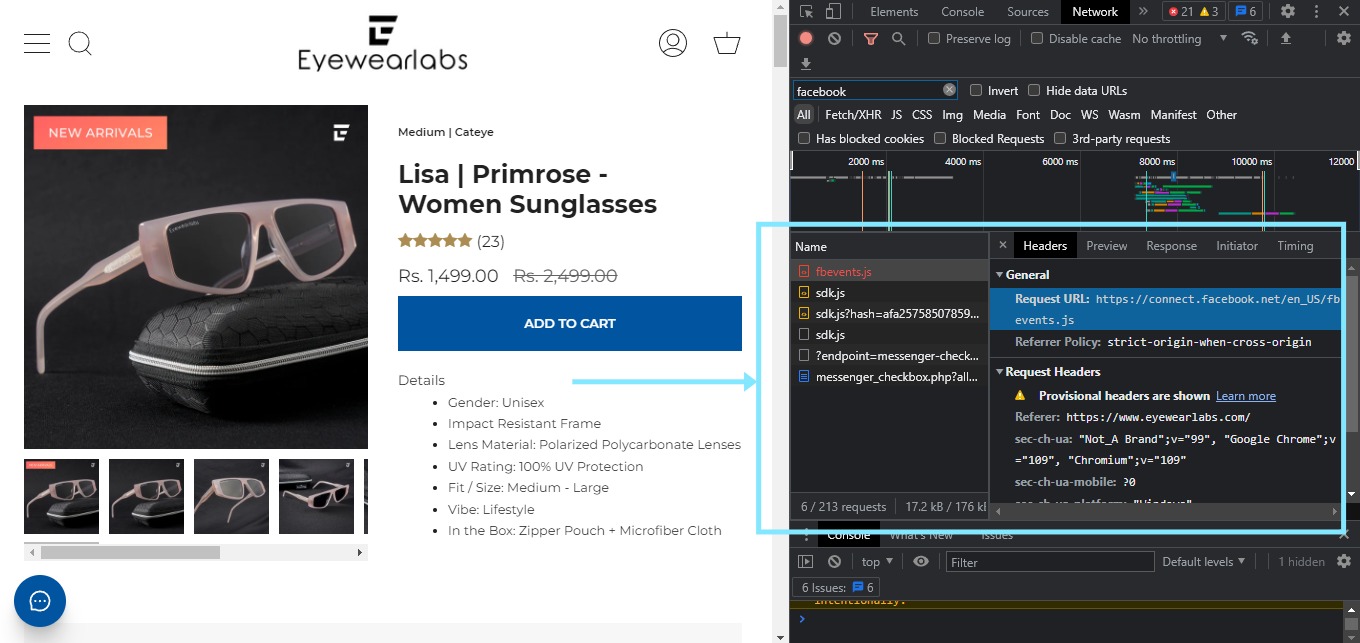
When you land on this particular page, here’s how the Meta pixel works in the background:
These are the requests made by Meta Pixel to the browser for collecting your unique ID. This unique ID helps brands run the retargeting campaign to show us the product we browsed.
Once you add this product to our cart, Meta Pixel will catch that information too. To see the magic of the pixel, let’s abandon this cart.
Once you leave the site and go to Facebook — here’s what you come across:
_1697116997.png)
Once a customer abandons their cart, the pixel shows ads to these customers making them more relevant and increasing the chances of conversions.
GoKwik helps businesses set up meta pixel on their site to improve brand visibility, target prospects and existing customer, and increase the chances of conversions.

Why Do Businesses Need To Install Meta Pixel?
Here are some reasons why you, as a brand, need Facebook pixel to back your strategies:
1. Improve ROI On Ad Spend On Facebook
Meta pixel by Facebook knows your audience inside out. It knows how they browse, what they browse, and their likes/dislikes.
It uses this data to get your ads in front of people who are most likely to respond positively (sales). And, this is a significant factor in determining your return on investment on ad spends. It helps you get more sales, improving your ROAS.
2. Leverage Facebook Conversion Tracking For More Sales
Another most powerful feature of Facebook pixel is its conversion tracking capability. This feature lets you see exactly how your audience responds to your ads and whether or not they’re taking action on your website. This information helps you tweak your marketing strategy to get the desired interactions and drive more sales.
3. Lower Your Customer Acquisition Cost With Enhanced Retargeting Ads
Retargeting is a crucial strategy for any D2C eCommerce business, and Meta pixel takes it to the next level.
With retargeting data that the Facebook pixel collects, you can show ads to people who have interacted with your website. This data allows you to create personalised ads that target specific products that people have already shown interest in. It lowers your customer acquisition costs and boosts your ROI.
4. Create Lookalike Audience
Meta pixel also helps D2C businesses create lookalike audiences like their existing customers. This feature helps expand the audience set based on actual data rather than assumptions.
Using Facebook pixel, you can identify the common characteristics of your existing customers and create an audience that shares those characteristics.
By creating lookalike audiences, you can reach new customers who are similar to your existing customers but may not have heard of your business before.
How To Install Facebook Meta Pixel?
Now that you know how Meta pixel works and why you need to get it, it’s time to install it on your website.
Just follow the below-mentioned simple steps and start collecting valuable user data. GoKwik helps set up Facebook pixels to ensure smooth functionality from the get-go.
1. Create A Meta Pixel
To create a Meta Pixel,
- go to the “Event Manager” page in your Facebook account
- Click on “Connect A Data Source”
- In the following menu, select “Web” and click “Connect”
- A new section will pop up — “Set Up Web Events”
- Click on “Meta Pixel” and proceed
_1697116997.png)
In the following menu, fill in Meta pixel details such as name and website link of your D2C business to check for integration partners. Once done, your pixel is created and ready to run.
2. Add the Meta Pixel To Your Website
Once you’ve created the Meta pixel, now add it to your website. There are three ways do so:
- Install Manually
- Using Partner Integration
- Asking Your Website Developer
Of the three methods, the easiest way to add a Meta Pixel to your website is via partner integration. You just need to follow a few prompts from Facebook to add the pixel in no time.
However, if you’re doing it manually, you need to put the Meta Pixel code in the global header of your website, i.e., under the tag. Putting it under the global header ensures that the pixel can track the activity on each page.
How To Use Meta Pixel’s Targeting Options?
It might surprise you, but the Facebook pixel code doesn’t do any targeting. You have to decide how you want to target your audience and customers.
Listed below are four major Meta pixel targeting options:
1. Custom Audiences From Your Website
Targeting people who have visited your website is easy with Facebook’s custom audience option.
By adding a Meta pixel to your site, you can track user behaviour and create lists of people who have visited certain pages, added items to their cart, or completed a purchase.
Using this custom audience, you can target these users with ads on Facebook or Instagram.
The benefit of this? You can reach people who have already shown interest in your business and craft messaging specific to their behaviour on your website, resulting in higher conversions and better ROI.
2. Custom Conversions
Custom conversions allow you to track specific user actions on your website, such as filling out a form or making a purchase.
By setting up a custom conversion, you can track how many people are completing these actions and optimise your ads to target users who are more likely to take them.
3. Standard And Custom Events
Facebook pixel events track user actions for your website, like clicks, views, and form submissions.
Standard events are predefined by Facebook, while custom events allow you to track more specific actions important to your business.
For example, an online clothing store can track when users who view the women’s dresses category page and create a custom audience to target with ads. Showing those users ads featuring women’s dresses can increase the chance of a conversion.
4. Dynamic Ads
Facebook Pixel also allows you to run dynamic ads. These highly personalised ads show people the products or services they have previously viewed on your website.
It’s highly effective in increasing conversion rates and ROI, as it shows people the products they have already expressed an interest in.
It also saves time and effort in creating individual ads for each product or service, as the ads are generated dynamically based on people’s behaviour on your website.
To Conclude
The customer acquisition cost has been rising across industries. It’s mainly due to the increasing media cost and competition for customer attention.
With this increasing competition, businesses must spend each dollar on Facebook ads strategically. Every decision you take must be based on data rather than assumptions.
And, Meta Pixel is one way to collect user data and use it to reach the right people at the right time with the right message.
Frequently Asked Questions
How Much Does Meta Pixel Cost?
Installing Meta pixel or Facebook pixel on your website is completely free. Advertising on Facebook comes with a cost. However, the pixel helps businesses, especially eCommerce D2C brands save money they spend on advertising as they can derive essential information out of ads and use the same to improve their return on ad spends.
How Many Meta pixels Do I Need?
Facebook enables every account holder to create and use as many as 100 pixels in their account. However, one meta pixel with sufficient data is more than enough to help improve your ad targeting and increase the chances of conversions.
What Does A Meta Pixel Collect?
The Meta pixel collects valuable data on visitor behaviour and cross-device activity. This data can further be used to improve ad targeting, messaging, and conversion rates.

AUTHOR
Suhag Vamja
Head of Product Marketing @ GoKwik