How KwikAds helped Shop Unrush boost ROAS by 37% in 3 months
How KwikAds helped Shop Unrush boost ROAS by 37% in 3 months
How KwikAds helped Shop Unrush boost ROAS by 37% in 3 months
How KwikAds helped Shop Unrush boost ROAS by 37% in 3 months
Kwik Checkout
GoKwik Address Pre-fill: Reduce Friction, Boost Conversions
 12 Mar 2026
 08 Min Read
Parousia leads product marketing strategies at GoKwik, and she is an expert in driving e-commerce optimisation, conversion growth, and innovative GTM strategies. She crafts compelling messaging and creates content pertaining to D2C commerce.
Read this blog on your favourite platform
According to the India Brand Equity Foundation (IBEF), India’s online shopper base has increased by 125 million in the last three years, and another 80 million are expected to join the club by 2025. It’s no surprise that the country’s eCommerce market is touted to reach USD 111 billion by 2024 and USD 200 billion by 2026. However, in a bustling industry like eCommerce, where every click counts, a fast checkout with no friction is the very expectation and acts as a make-or-break point for shoppers to either seal the deal or abandon their carts. Among the critical stages of this process, the shipping or address stage is where drop-offs occur most frequently. To tackle this problem, GoKwik has built the most seamless address pre-fill mechanism reducing the chances of drop-offs to a minimum.
In this blog, we aim to decode the importance of offering address pre-fill as a service to shoppers and ensure a smooth and seamless checkout process. Let’s begin.
Address Stage: The Achilles' Heel Of Checkout
The address stage is ideally the point when an eCommerce brand asks a shopper to enter their shipping details such as their full name, email ID, delivery address, etc. In the entire checkout journey, it is the address stage that often emerges as the Achilles' heel contributing to about 22% of the cart abandonment rate. That’s primarily because, while getting the right address details is critical for eCommerce brands to process an order, asking too many details is where the deal breaks. Most native checkout processes ask shoppers to fill as many of 14 form fields, making it too lengthy and tedious for shoppers, causing irritation and resulting in drop-offs.
But how to solve this challenge?
Fortunately, there are several strategies that eCommerce brands can employ to optimise the address stage and reduce cart abandonment rates. One such solution is GoKwik’s address pre-fill feature.
Address Prefill By GoKwik
22% drop off at the address stage is a significant number of potential orders for any eCommerce brand to lose. Even if the brand’s average order value is INR 1000/-. This means a potential loss of about INR 22000/-.
To solve this pressing concern, GoKwik has built the most unique and frictionless address prefill mechanism for eCommerce brands. Backed by data of 100 million+ shoppers, GoKwik leverages its intelligence and this massive data to autofill address of a shopper based on their previous shopping history. This gives shoppers the leverage to just verify the prefilled form information and move to the payments page to complete the transaction.

Here’s a glimpse into GoKwik’s address prefill logic.
Auto-filling Addresses For Existing Shoppers
Based on a shopper’s mobile number entered at the time of login, GoKwik runs a quick check into its existing database of 100 million+ shoppers.
- If the shopper’s complete address is present in GoKwik’s database then it automatically showcases the same to the shoppers at the address stage.
- If the address is incomplete but the eCommerce brand has the shopper’s complete address, then GoKwik fetches that data and presents the prefilled address to the shopper.
- Meanwhile, if a shopper’s data is not present in either GoKwik’s database or that of the eCommerce brand, then GoKwik will prompt the shopper to enter their address in just 4 easy steps.
- Having partnered with many other service providers, GoKwik also leverages its data to try and autofill addresses for a shopper to reduce any and every kind of friction at this stage.
- If the database finds multiple addresses linked to a shopper, it automatically selects the latest address on the checkout panel.
Here's how an auto-filled address page appears on GoKwik’s checkout pop-up window.

Adding A New Address
As mentioned above, if a shopper’s address is not present in GoKwik’s database or that of its partners, then GoKwik enables shoppers to enter a new address in the quickest way possible.
Where most native shipping forms start by asking for first name, last name, and a lot more information from a shopper, GoKwik starts by asking for their pincode. Based on the entered pincode, GoKwik auto-fills 40% of the address including city and state. It further simplifies the process by only asking for the shopper’s full name, complete address and email ID. That’s it!
Is it not way simpler than the prefilled checkout address field in Shopify? Certainly it is!
Editing An Existing Address
GoKwik doesn't just stop here. It gives shoppers the ease of editing their existing address in a swish. It’s certainly easier than googling “how to change home address on iPhone autofill?”
While GoKwik shows a shopper’s recently updated or used address on its address panel, you can use its “Edit” functionality to change details and ensure the order gets delivered to the right address to the right person.
Error Identification
While all the above steps help ensure that a shopper doesn’t face any issues while placing an order, many times, shoppers place fake or incomplete addresses which adds to an eCommerce brand’s losses. To avert this, GoKwik has built an error detection mechanism owing to its RTO protection suite.
1. Invalid Name
if a shopper’s full name is short, then an error message will appear as “Your name is too short. Please enter your name properly.” Here, GoKwik’s logic says,
- The first name should not be <3 characters
- If a name, for instance, is “Mr. XYXX ABCD” then Mr. XYXX is considered as the first name to remove any false errors that may otherwise occur.

2. Invalid Email ID
If a shopper enters an invalid email ID, then GoKwik will show an error message saying “Invalid Email ID. Please enter a valid email ID”. Invalid emails are checked based on domain and other sanity features.

3. Invalid Shipping Address
If a shopper has entered an invalid address, then GoKwi will display the following error message - “Your address length is less than 12 characters. Please enter a proper address to continue.”
GoKwik pays much attention to this field considering that this is the most critical element in processing an order. As per our internal data, addresses less than 10 characters excluding spaces contribute to about 35% of RTO cases in the fashion industry. The same averages to about 41% in the beauty and personal care industry and nearly 60% in the electronics industry.

4. Invalid pincode
If a shopper enters a pincode that does not exist in India, then they’ll see the following error message “Invalid pincode. Please enter a valid pincode.”
Meanwhile, if a shopper enters a non-serviceable pincode, they will see a prompt message saying, “We currently do not deliver to this pincode.”

Address Prefill Enabling One Click Checkout
Notching one step further, GoKwik now enables eCommerce brands to offer 1-click checkout to shoppers. A seamless checkout process wherein existing shoppers will directly land on the payments stage as soon as they click on the checkout/confirm order button.
Shoppers can verify their shipping address details on the same window, select a payment option of their choice and complete the translation with just one simple click.
From an eCommerce brand’s point of view, 1-click checkout helps in the following ways.
- Optimises the flow for repeat users
- Eliminates both login and address stage steps in the process
- Brings shoppers closer to the one-click checkout experience
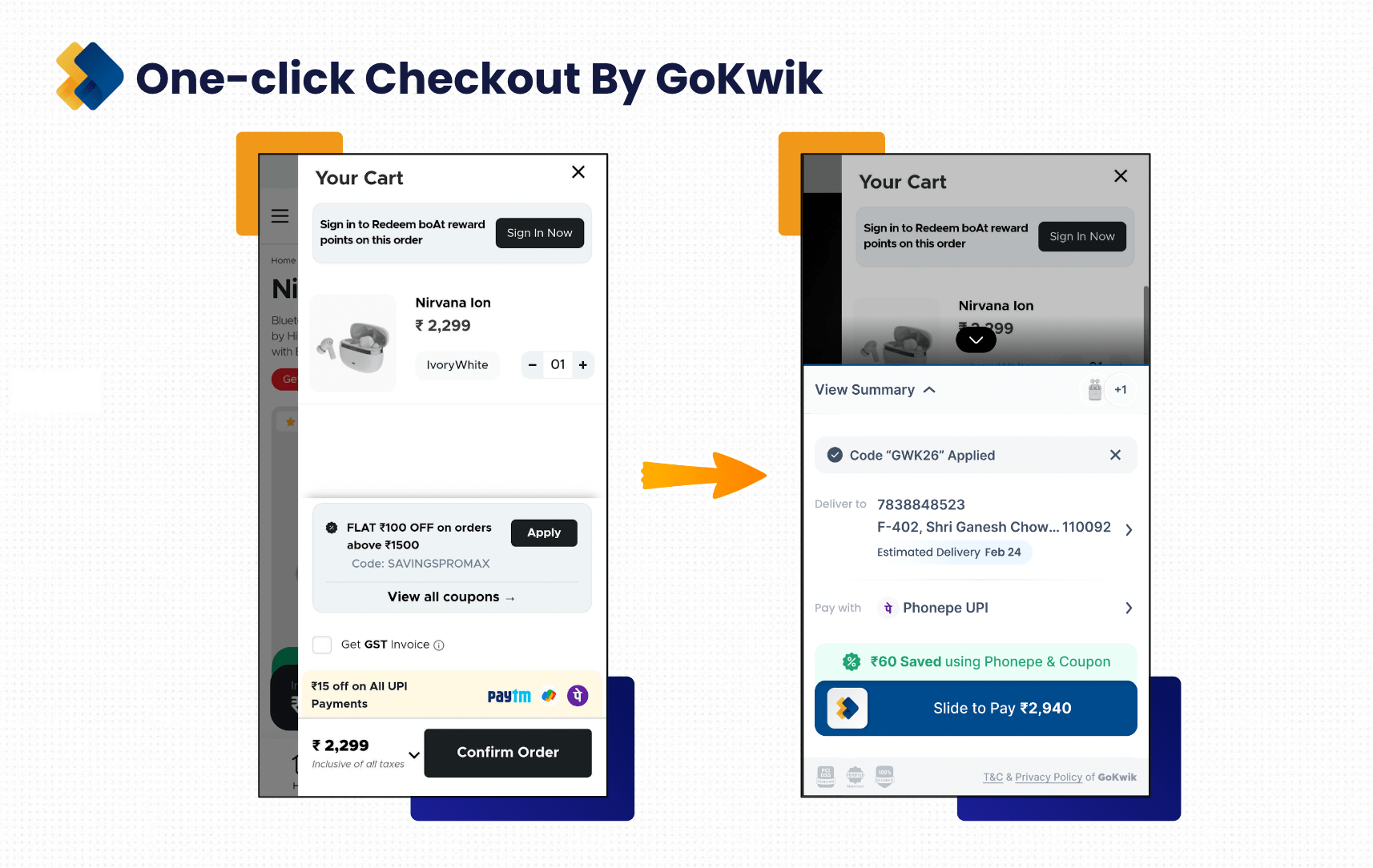
One-click checkout maintains and offers all the same functionalities to shoppers such as editing details, adding new addresses, and so on. For example, shoppers can click on the edit button next to the phone number to change their number. They can also edit their address or add a new one with utmost ease and comfort.
Still Hanging On to Native Checkout Leaking Conversions?
While Google address autofill can serve as handy for shoppers to quickly fill their addresses when placing orders, is it still good enough to reduce or even eliminate drop-offs at this stage?
Working with 1500+ brands across all eCommerce categories, GoKwik can proudly claim the superiority of its fast checkout process and autofill address feature. With a database of 100 million+ shoppers (more than many seasoned organisations across India) and an excellent accuracy level, GoKwik’s address prefill feature significantly increases the chances of conversions and builds a brand reputation in the market.
If, as an eCommerce brand, you’re still using native checkout, switch to Kwik Checkout by GoKwik today!

AUTHOR
Parousia Khan
Senior Product Marketing Manager @GoKwik